
 October has crept onto the calendar, and our team has a few tricks and treats up our sleeves. Let’s see what they’ve been brewing.
 Our engineers have:
 API & Security Updates:
 API Key Expiration:
You can now set an optional expiration date for individual API keys. Once that date is reached, the key automatically stops working, making it especially useful for temporary integrations or access.
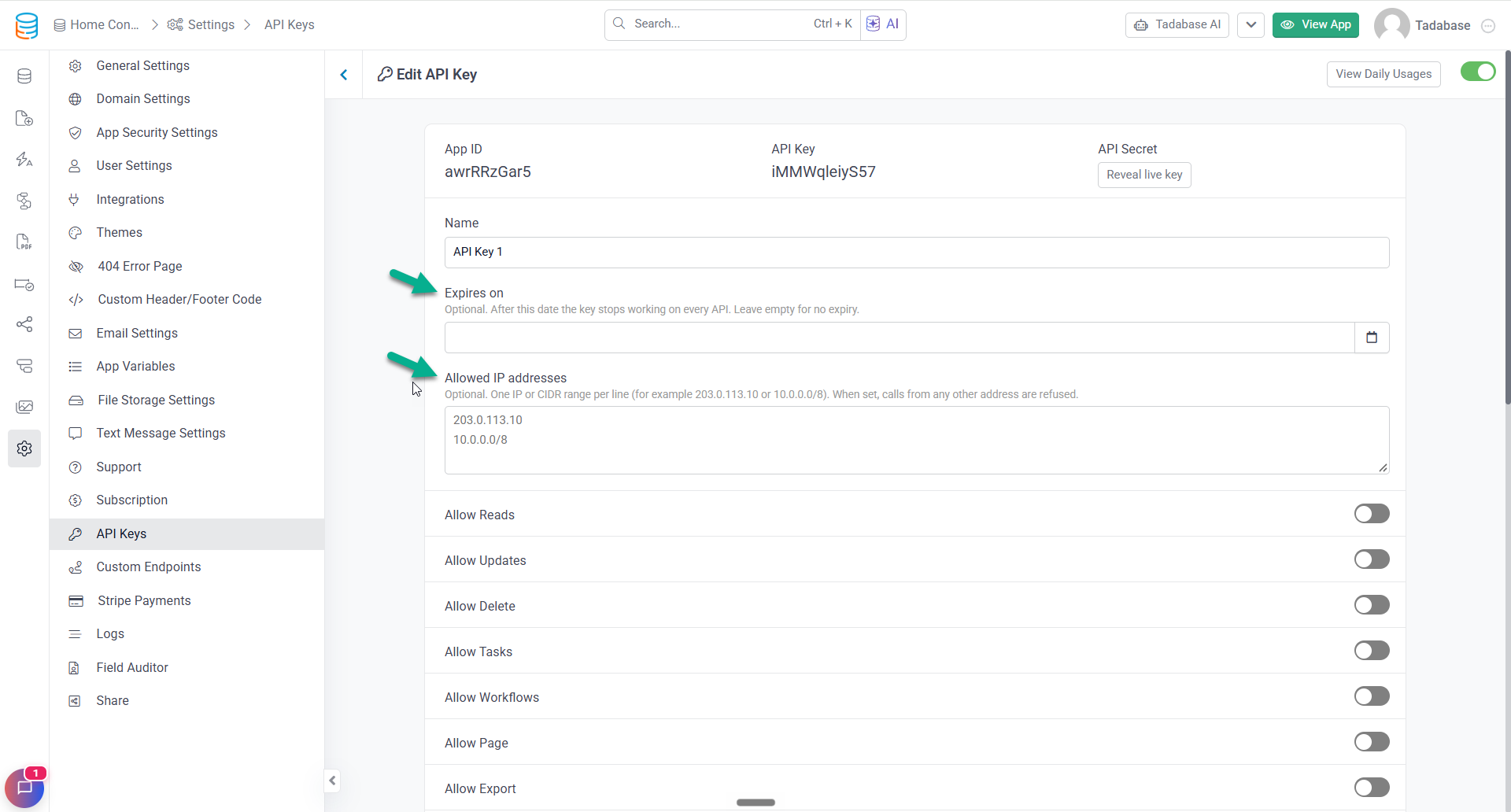
 IP Restrictions for API Keys:
API keys can now be restricted to specific IP addresses or ranges, giving you more control over where each key can be used.
 Additional Security Improvements:
We’ve rolled out additional security improvements across the platform, including record updates, field settings, PDF pages, app sharing, and integrations. No action is required.
 Records, Data Tables & Imports
 Import Beta Improvements:
Import Beta now gives you clearer results showing exactly how many records were added or updated, and warns when duplicate values are found in the field being used to match records. Date format suggestions are also smarter, and the Import window is now larger to make mapping easier.
 Around the Builder
 More Control Over Search Form Connections
Connection field dropdowns in Search Forms now include a Total Records to Load setting, giving you control over how many connected records are loaded into the dropdown.
 Tada AI & Studio:
 Export Records
You can now export records directly from the AI builder, with options to export All Records, Filtered Records, or a Saved Template. Export progress is shown as it runs.
 Easier Plan Changes:
Switching plans now takes you directly to Stripe to review the selected plan and prorated amount before confirming. Plan comparisons have also been improved with easier navigation and clearer pricing when adding app slots.
 More View Actions:
The View Editor now includes an Actions tab where you can add, edit, and remove buttons, including row actions, row selection, and bulk actions.
 Cleaner Published App URLs:
Published apps now consistently display their tada.app address instead of the underlying hosting provider address.
 Bug Fixes:
- Fixed screenshots pasted or uploaded into Rich Text fields not being handled correctly.
- Fixed Import Beta incorrectly reporting that non-numeric values were saved as “0” when they were actually left empty.
- Fixed the Upgrade button not working from the plan comparison and signup wizard.
- Fixed the records grid freezing during exports.
- Fixed Map popup titles remaining visible when Hide Title was enabled and some Map pins appearing empty with Starter icons.
- Fixed Accordion components not applying First Row Open across every page.
- Fixed multi-step forms opened from a Calendar not retaining the selected date.
- Fixed Kanban boards not displaying the Unassigned column.
- Fixed Pivot Value Column defaults not correctly displaying “0” or “None.”
- Fixed connected fields in Forms missing the Hide Title option.
- Fixed the VS Code connection instructions missing a Windows PowerShell command.
- Fixed new apps created by workspace members incorrectly using the member’s credits instead of the appropriate workspace credits.
For a complete list of fixes, see our release notes here.
 And with that, we’re putting the cauldron away for now, Tadabasers. Happy building and see you next week!
