I’m trying to automate a workflow and am running into a file corruption issue. I’m hoping someone can spot what I’m doing wrong.
The Goal:
When a survey is completed in NestForms, I want to take the generated PDF from that submission and upload it to a “File” field in the correct record in my Tadabase app.
My Make.com Scenario:
My scenario is set up as follows, and it runs to completion without errors:
-
Webhooks (Custom webhook): Receives the full JSON payload from NestForms.
-
Webhooks (Webhook response): Immediately sends a 200 OK status to prevent timeouts.
-
Iterator: Correctly pulls the Record ID from the JSON data.
-
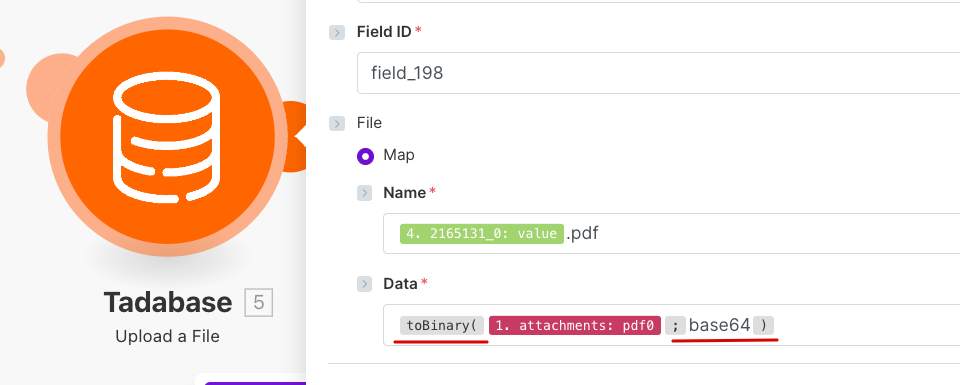
Tadabase (Upload a File): The final step, configured to upload the PDF.
What’s Working:
-
The scenario triggers correctly every time.
-
The Record ID is read successfully.
-
The scenario completes without any timeout or API errors.
-
A file with the correct name is successfully created in the correct Tadabase record.
The Problem:
The PDF file that gets uploaded to Tadabase is always corrupted and cannot be opened.
About the Data:
The JSON from NestForms provides the PDF as a Base64 encoded string. I have tested this Base64 string independently, and it decodes into a perfectly valid and readable PDF. This confirms the source data is good.
What I Have Already Tried in the Tadabase Module:
To solve the corruption, I have tried sending the data in two different ways, and both failed:
-
Converting to Binary: Using Make’s base64() function on the PDF string to send binary data.
-
Sending Raw Text: Sending the raw Base64 text string directly without using any function.
Both methods result in an unreadable file in Tadabase. Since the source data is valid and the scenario runs without error, it seems to be an issue with how the file data is being processed or sent by the Tadabase module.
Could anyone advise on the correct way to handle a Base64 encoded file upload for Tadabase within a Make.com scenario?
Thank you for your help.