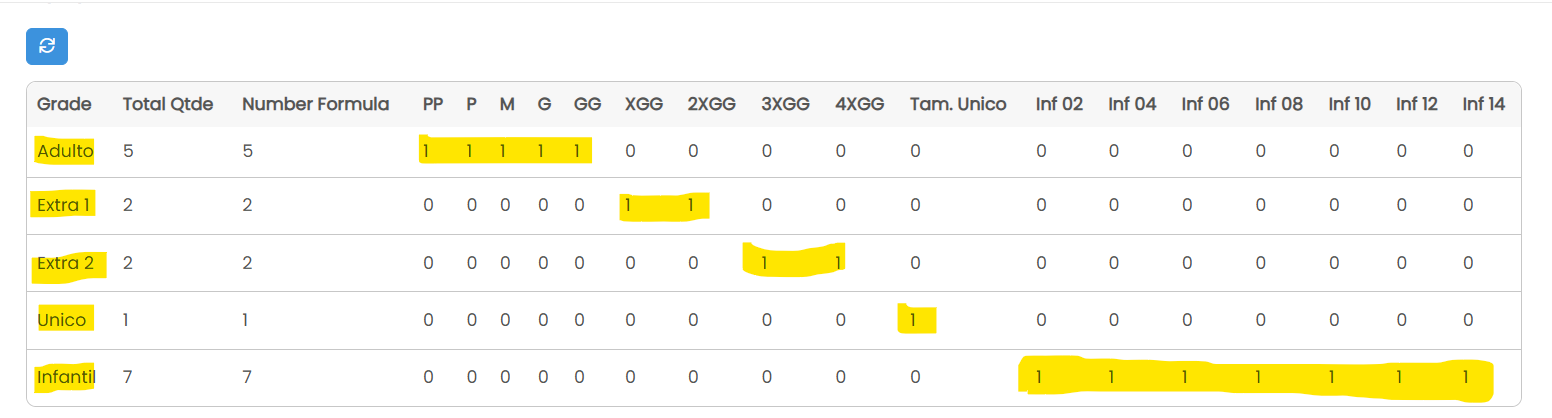
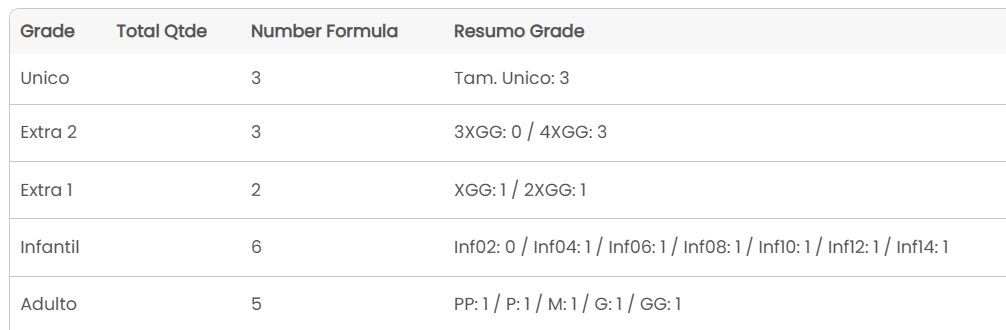
I managed to solve this using a different approach that turned out to be much cleaner for the UI and performance.
Instead of trying to dynamically hide specific columns in the Table Component (which can be buggy with pagination and different view modes), I decided to process the data using a Custom Server-side JavaScript Pipe.
The Strategy: I created a text field called Grade_Summary in my Items table. Whenever a record is saved, a Record Rule triggers this Pipe. The Pipe receives all size quantities and the “Grade Type” (Adult, Child, etc.) and returns a formatted string.
The “Hybrid” Logic: With the help of Gemini, we developed a script that ensures visual consistency:
-
Standardized View: If the item is “Adult”, the script forces the display of the standard grid (PP, P, M, G, GG), even if the quantity is 0. This helps the warehouse team read the data in a consistent pattern.
-
Fallback View: If the “Grade Type” is not recognized or is a custom mix, it falls back to showing only sizes with values greater than 0.
Here is the code I used in the Custom JavaScript Pipe (System Pipe):
(function() {
    // 1. Capture the Grade Type (e.g., "Adult", "Child") from your Record
    const gradeType = "{tipo_grade}";

    // 2. Map all your input parameters (Pipe Inputs)
    // Ensure these slugs match your Pipe Parameters exactly
    const values = {
        "PP": "{pp}",
        "P": "{p}",
        "M": "{m}",
        "G": "{g}",
        "GG": "{gg}",
        "XGG": "{xgg}",
        "2XGG": "{extra2}",
        "3XGG": "{extra3}",
        "4XGG": "{extra4}",
        "One Size": "{unico}",
        "Inf02": "{inf02}",
        "Inf04": "{inf04}",
        "Inf06": "{inf06}",
        "Inf08": "{inf08}",
        "Inf10": "{inf10}",
        "Inf12": "{inf12}",
        "Inf14": "{inf14}"
    };

    // 3. Define the Fixed Groups
    // IMPORTANT: The keys here must match your Dropdown options in Tadabase exactly.
    const groups = {
        "Adulto": ["PP", "P", "M", "G", "GG"], // Always show these for Adults, even if 0
        "Infantil": ["Inf02", "Inf04", "Inf06", "Inf08", "Inf10", "Inf12", "Inf14"],
        "Extra 1": ["XGG", "2XGG"],
        "Extra 2": ["3XGG", "4XGG"],
        "Unico": ["One Size"]
    };

    let summary = [];

    // 4. Logic: Check if the Grade Type exists in our fixed groups
    if (groups[gradeType]) {
        // STANDARD MODE: Show all sizes in the group to maintain visual pattern
        const groupSizes = groups[gradeType];

        groupSizes.forEach(size => {
            const val = parseInt(values[size]) || 0;
            summary.push(size + ": " + val);
        });

    } else {
        // FALLBACK MODE: If Grade Type isn't found, show only non-zero values
        for (const [size, qty] of Object.entries(values)) {
            const val = parseInt(qty) || 0;
            if (val > 0) {
                summary.push(size + ": " + val);
            }
        }
    }

    // 5. Return the formatted string
    return {
        result: summary.length > 0 ? summary.join(' / ') : "No sizes selected"
    };
})();
Implementation: Then, I just mapped the pipe response result.result back to my Text Field using a standard Record Rule.
The result is a single clean column like “PP: 10 / P: 0 / M: 5 / G: 10 / GG: 0” instead of 17 columns full of empty zeros.
Hope this helps anyone trying to manage complex apparel grids!