Good day Tadabasers,
After watching Tim’s great video (linked below, around 04:55) where he re-uses the Profile Component, it got me thinking about whether the Login Component could also be repurposed to enforce authentication during critical Workflow steps.
(Video link: Build it with Tim - Hide Fields Based On User Preferences)
I work in the pharmaceutical sector, where certain workflow actions - especially those involving final approvals, reversals, or record closure - require the user to re-enter their password as an equivalent to a regulated electronic signature. Because of this, re-authentication at key points is not just a convenience; it is an essential control for GMP-aligned processes.
My initial idea was to embed the Login Component into a workflow form so the user would be prompted for their Current Password before the record progresses. However, when I tested this, the component automatically inserted all three fields: Current Password, New Password, and Confirm New Password. That behaviour does not meet the requirement, as I only need the Current Password — not a password-change flow.
Ideally, I am trying to achieve the following:
-
A single Current Password prompt as part of a workflow step.
-
Validation against the user’s actual Tadabase login credentials.
-
Enforcement of existing security policies, including account lockout on failed attempts.
-
A seamless re-authentication process before the workflow can move to the next step.
Has anyone managed to achieve this using on Tadabase?
Or is there another recommended approach for enforcing password re-authentication during workflow transitions?
Screenshots:
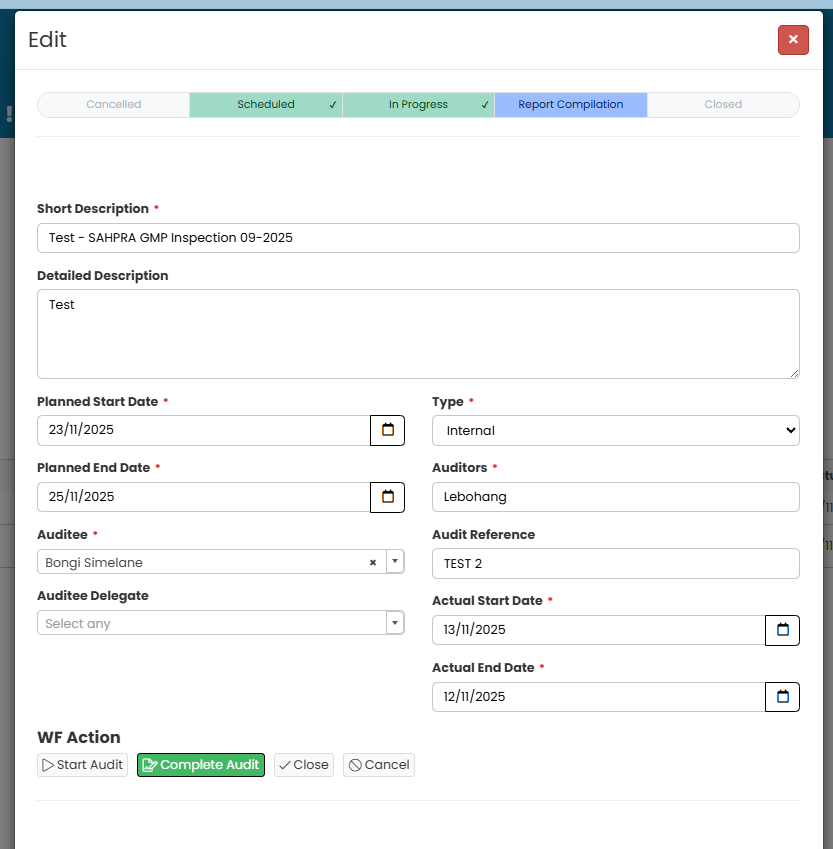
In the screenshot, when I click the Close button (action button), which will subsequently set Status to Closed, I want the user to be prompted with a password field upon password re-entering, where he will enter current credentials
Any guidance or ideas would be greatly appreciated.