I’m building a multistep Form where each step writes to a different table (Enquiries → Jobs → Vehicles, etc.).
Example flow:
Step 1: Create Enquiry
Step 2: Update Enquiry
Step 3: Create related Job
Step 4: Optional related records
Is this feasible?
I’ve been exploring connecting fields but it’s only for display. I’ve also thought of duplicating the properties from different tables into enquiry table and then create new records to the different tables upon form submit. However, I might as well create multiple pages if this is the case.
I’m down in the rabbit hole and wanted to make sure if it’s feasible or not to further avoid wasting time.
P.S. I’ve been exploring another concept which is dependent dropdowns but I don’t see it on my end too
Hi @joshua, Welcome to the Tadabase community. In response to your question, no, not in the sense of one multi-step form natively writing each step to a different table. A Tadabase multi-step form is still one form for one table, just split into steps, and a field can only be displayed once, regardless of which page it is shown on. There are a few different ways of achieving the feel of what you are going for. You could create a page with multiple page tabs (this function is hidden a bit).
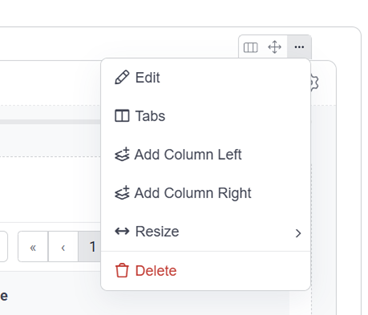
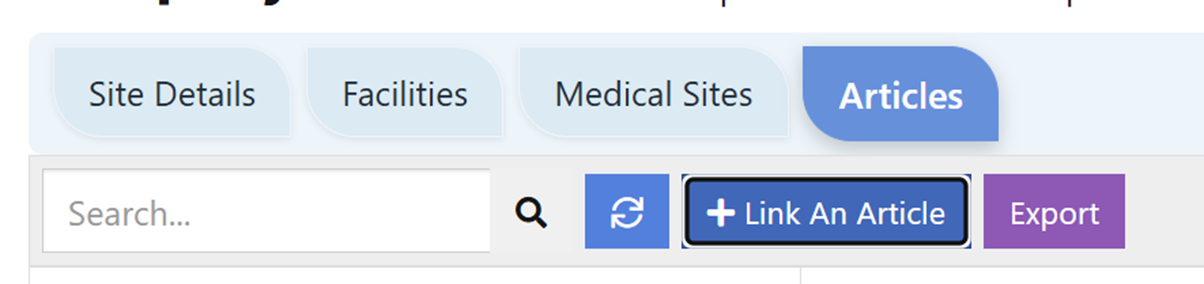
Click on the column button and select “Tabs”. Create tabs for each of your steps – Create Enquiry | Update Enquiry etc. That will create this sort of tab arrangement. Later you can use CSS to configure the tabs to look more like a multi-step process visual rather than simple tabs. Each tab can have a different table attached, which is your end-goal. These are the tabs that are created (these have been styled as normal tabs, but could look like anything you want). You could change them to emulate the circle with lines affect that you see on the multi-tab feature you were playing with earlier.
I don’t know what level you are coding at, but these changes were done using ChatGPT, telling it to give you page CSS to change the tabs to appear as a multi-step process. So that chat can determine which component names to work with - in your browser right click on the tabs and select ‘Inspect’ (at this point you need to be in your live app - not the builder), then take a screenshot of the Elements tab that will probably be displaying by default. (F12 will get you back to the normal screen) Paste the screenshot with your chat request to get working code. Sometimes you need a combination of CSS and Java Script to get the desired effect. Chat can create both code types for you. Simply paste the CSS or JS code into the page builder CSS or JS tabs, and when you next refresh you browser the changes will display. If your Chat code won’t save, there are probably imbedded icons in the code - the Tadabase code environment hates that. Playing with screen design is the fun part, so with a bit of practice, Tadabase makes it fairly easy to create great looking screens almost anywhere within your app.