
 With carols playing and cheer all around, our team is bringing the festive spirit to this update. Gather round and let’s unwrap it, together.
 Our engineers have:
 New Feature: Staged Restore
We have just launched a powerful new feature that gives you safe, controlled access to archived app data without impacting your live production environment.
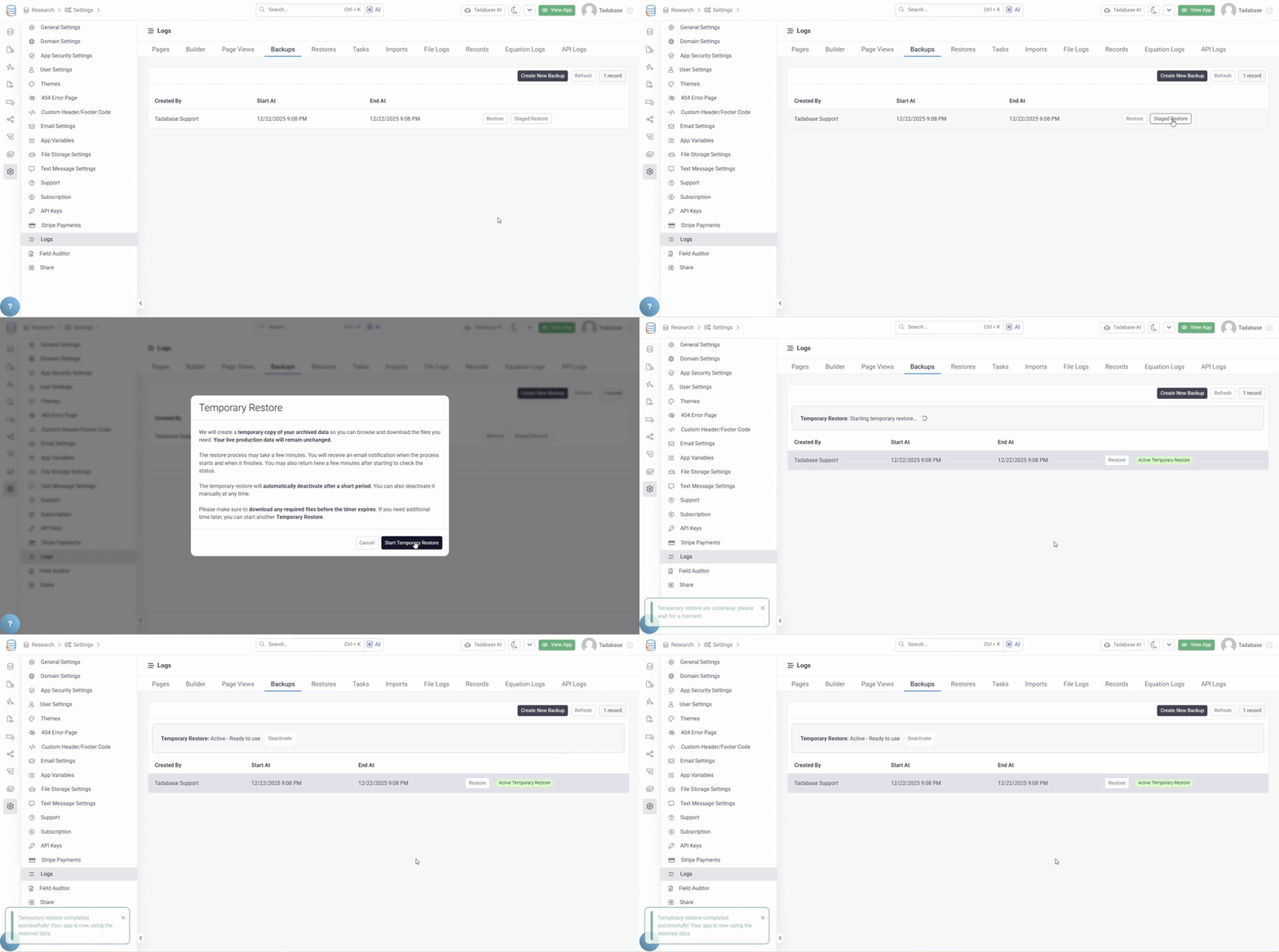
Staged Restore allows you to create a full staged version of your app using archived data so you can review, download, and verify exactly what you need with zero risk to production.
What Staged Restore Does
- Creates a staged copy of archived app data
- Keeps your live production app completely unchanged
- Provides a fully functional app experience with all features available
How It Works
- Start a Staged Restore from your app settings
- The system prepares the staged version in the background
- This process may take a few minutes
- You will receive an email when the restore starts and when it is ready
Once It Is Ready
- The staged restore remains available but inactive
- You choose exactly when to activate it
- You can activate or deactivate it at any time with a single click
While the Staged Restore Is Active
- Browse, export, and download data freely
- Any changes apply only to the staged restore
- Your live production app is never affected
Stopping and Returning to Live
- You can deactivate the staged restore at any time
- Returning to your live production environment is instant
- No data is overwritten
- Nothing carries over unless you explicitly export it
Why This Matters
- No pressure from timers
- Full control over access
- Safe recovery without risk
- Ideal for audits, investigations, exports, and peace of mind
Staged Restore is currently available starting this week on Elite level plans and higher.
 Bug Fixes and Updates:
- Updated URL handling and improved domain validation.
- Resolved an issue with PDF attachments not being included in form component email notifications.
- Removed the deprecated allow_app_variable option.
- Integrated HubSpot chat with the ProductFruits button and suppressed the default widget.
- Fixed an issue where text messages were not working in Connection fields due to a missing plus sign in phone number formatting.
- Added a Delete option to Multiple Send for text messages.
- Displayed the table name field on the PDF Pages list page.
- Fixed local file upload handling.
- Fixed text formula values not updating after record creation.
- Resolved issues where Rollup Fields were not updating.
- Added a Delete button to PDF Forms.
- Fixed an issue with rollup fields not updating on the app side in Action Rules.
- Fixed Kanban drag and drop issues including initial failure and field dependency problems.
- Added a Save button to the 404 Error Settings page to allow saving changes.
- Fixed the Data Builder default form value option not working.
For a complete list of fixes, see our release notes here.
 Universal Component Updates:
Thanks for all the great feedback on the new Universal Component. We’re excited to officially roll it out to all users over the next 48 hours.
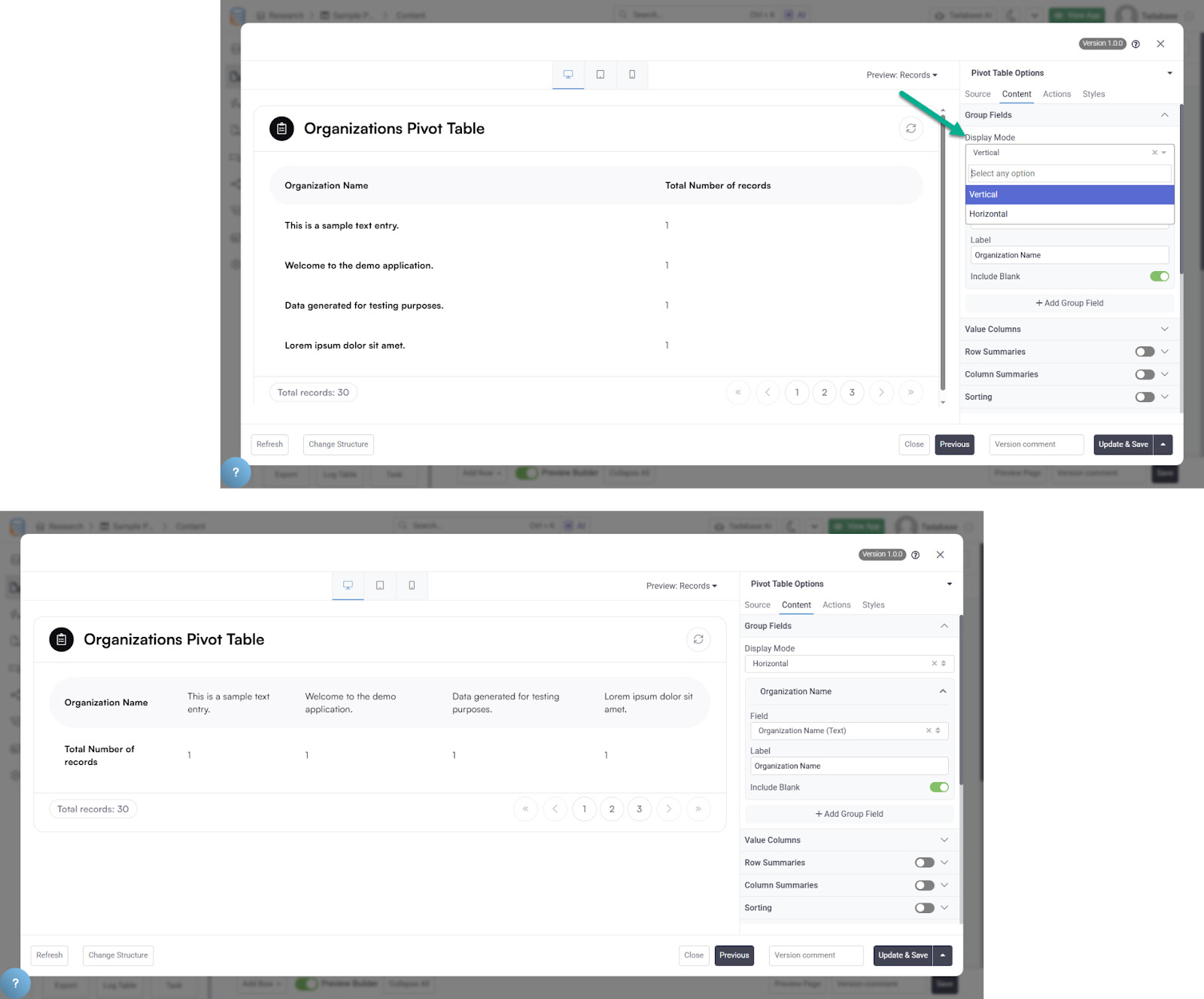
This release includes dozens of fixes and enhancements across all components, including new capabilities like transposing Pivot Tables, along with many other improvements. We’ll be sharing a full breakdown of all updates very soon.
 We’re tying this one up with a bow, Tadabasers. Happy building, Happy holidays, and see you next week!