
 Yesterday marks the first day of fall, and our team is turning over a new leaf with a fresh batch of updates. Let’s fall right in.
 Our engineers have:
 Workflow Updates:
Match Connection Fields by Any Field
Connection fields in Workflow actions can now match records using fields other than Record ID. A new Match By option lets you choose fields like email, company name, or even parts of composite fields, making it much easier to create connections dynamically.
 Custom Incoming Webhook Responses:
Incoming Webhook Workflows can now return a custom response to the calling service, including dynamic values from the Workflow run.
 More Incoming Webhook Controls:
You can now paste sample JSON to map webhook fields without sending a test request, enable email alerts when a webhook Workflow fails, and choose whether webhook Workflows run immediately or through the queue.
 Clearer Workflow Errors:
Workflow failure emails now explain what failed and why in clearer language, along with the same Run ID shown in Workflow History so you can quickly find the affected run.
 Safer Custom Code Inputs:
Custom Code now catches invalid input names before you save and offers a one-click option to rename them into a compatible format.
 Cleaner Loops:
The Looper has been visually refreshed to make nested steps easier to follow. You can also control when Equation fields are recalculated during a loop.
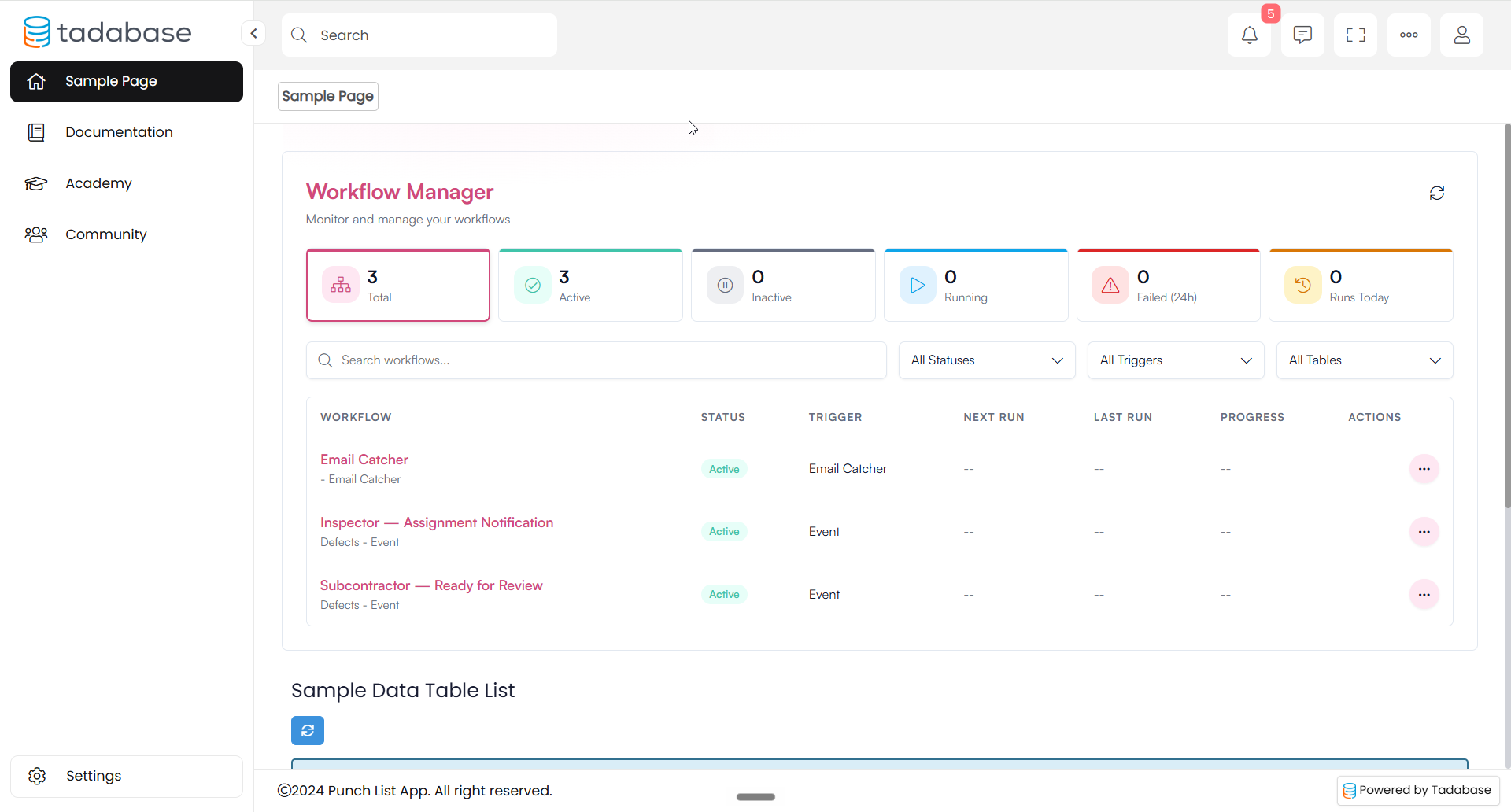
 Workflow Manager Component:
A new Workflow Manager component lets app users view and interact with selected Workflows directly from your app. Users can see Workflow statuses, run Workflows, view run history and execution details, and terminate active runs.
 Around the Builder:
New Support Experience
A new Support button in the builder makes it easier to reach our team without leaving your app. You’ll already be signed in, making it quicker to get the help you need.
 Tada AI & Studio:
 More Map Display Controls:
Map components can now use different fields for the List View and pin popups, giving you more control over what appears in each. Maps and Boards also now support paging, and Gallery cards now show exactly the fields you’ve configured.
 Safer AI Redesigns:
When an AI page redesign would remove a configured component, Tada AI now flags it instead of silently dropping it. You’ll also get clearer guidance for restoring components affected by a redesign.
 Better Support for Larger Apps:
App updates can now run for longer, helping larger and more complex updates complete without timing out.
 More Flexible Custom Components:
Custom components can now support multiple layouts, including Table, Kanban, Accordion, List, and Gallery, along with dedicated settings for content, data sources, styles, actions, and fields.
 Bug Fixes:
- Fixed several Custom Code issues, including date filters going blank, validation messages not appearing for reserved input names, and the AI assistant displaying internal error messages.
- Fixed Workflow failure notifications not sending correctly and failed notification emails being incorrectly recorded as sent.
- Fixed scheduled Workflows displaying incorrect run information and improved timezone handling across active and inactive schedules.
- Fixed the Workflow Manager component not displaying Workflows in previews.
- Fixed Name fields in Tada AI displaying Title and Middle Name when only First and Last Name were configured.
- Fixed cards, columns, and detail rows in Tada AI displaying internal field names instead of their proper labels.
- Fixed the Tada AI record picker briefly displaying raw Record IDs while connected record names loaded.
- Fixed the Tada AI Pivot panel displaying an unnecessary Aggregation option for Total Number of Records.
- Fixed the Credits page excluding Studio builds from total credit usage. Build charges now also identify the app and step.
- Fixed the Opportunities blueprint incorrectly naming its table “Opportunitie.”
For a complete list of fixes, see our release notes here.
 And with that, we’ll leaf this one here, Tadabasers. Happy building and see you next week!